
Client Guide to Net Documents
Welcome Email
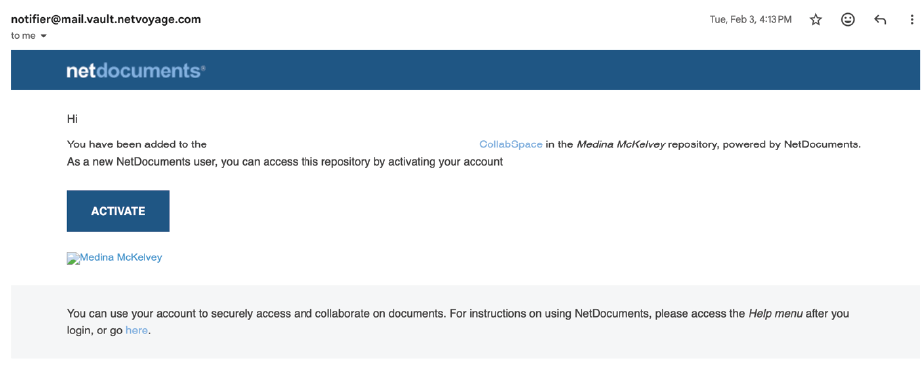
Upon first being added to the Medina McKelvey Repository, you will receive a welcome email at the contact address you provided.
01.
The welcome email will be sent from notifier@mail.vault.netvoyage.com. If you do not see it, please check your spam or junk folder, or contact the firm to have it resent.
02.
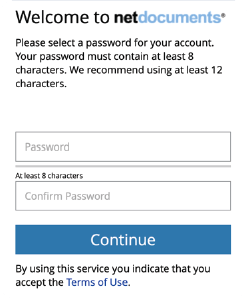
Activate and Login using your credentials. The username is the email you provided. When selecting Activate from the welcome email, you will be directed to the page below to set a password.
Email Link Invitation
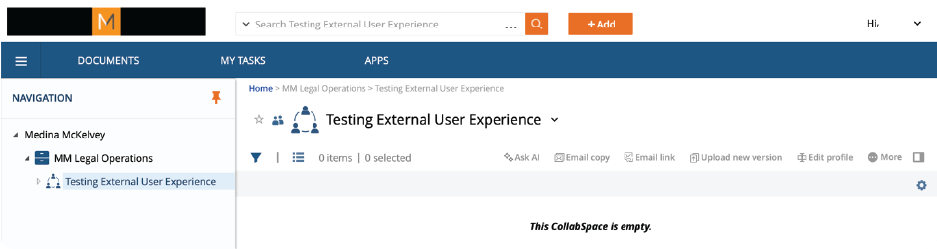
Medina McKelvey’s standard procedure for external document management is to use NetDocuments CollabSpaces. A CollabSpace is a secure area within the repository that allows clients to upload documents and, if needed, create folders to organize their files.
Invitation emails contain a direct link to the designated CollabSpace. Choose Open.

How to Upload Files
The simplest means of uploading files to Net Documents is via the +Add button.
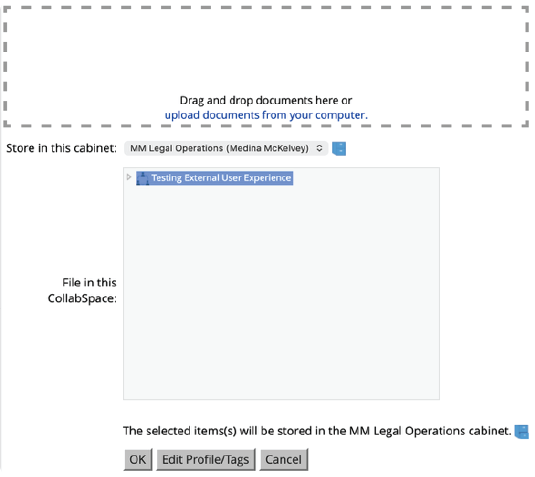
After clicking +Add, select Upload. Choose your files and ensure the correct filing location is designated. Click OK.
NetDocuments does not provide a separate confirmation message when an upload is successful. Instead, uploaded files will appear in the CollabSpace once the upload is complete. If you suspect an error during the upload process, try refreshing your browser or logging out and back in. If the issue persists, please message your point of contact at the firm for assistance.
Lawsuit Mitigation
Contact
MEDINA McKELVEY
Roseville
Sacramento
San Francisco
S. Lake Tahoe
Fresno
Los Angeles
© Copyright 2024, Medina McKelvey LLP. All Rights Reserved. Accessibility | Privacy Policy | Terms of Use